


How to Use Text to Music AI to Turn Words into Music
Most people who write lyrics or short text ideas eventually wonder the same thing: how do I turn this into an actual song? Not everyone has the tools—or the musical background—to compose melodies or build full arrangements from scratch. That’s exactly where text-to-music AI becomes useful.
With just a few sentences, you can generate melody, harmony, and instrumentation automatically. The process feels closer to describing a song than composing one. This makes it perfect for beginners, but surprisingly helpful even for experienced creators testing ideas.
In this guide, we’ll walk through how to use Media.io AI Text to Music to create music with AI, and how the platform helps you shape your text into a complete musical idea in a few clicks.
What Is Text-to-Music AI?
Text-to-song AI converts written language—lyrics, prompts, emotional cues—into a structured piece of music. The tool processes your text in several layers:
- meaning
- tone
- emotional direction
- rhythm of the words
- intended genre
Then it produces a musical interpretation of what you wrote.
This makes it a powerful helper for:
- lyricists wanting to turn words into music
- creators needing background audio
- beginners learning how songs are structured
- musicians exploring fresh ideas quickly
It’s also useful when you want to make a song with AI but don’t have the tools to compose manually.
Why Use Media.io as Your Text-to-Music AI?
WonderShare Media.io stands out because it’s not just a music generator—it’s part of a unified AI creation platform built around multimodal large models. This gives it an advantage in flexibility, workflow, and speed.
1. Multiple Large AI Models Work Together
Media.io uses several advanced models simultaneously:
- A text-understanding model interprets your description
- A music-generation model composes melody, rhythm, and instrumentation
- A style model adjusts mood and genre
This multi-model approach helps the AI produce music that actually matches your text—not random results.
2. 5000+ Templates for Building Complete Projects
Media.io includes over 5000 creative templates, including:
- lyric video templates
- album cover layouts
- social media visual templates
- content creator video presets
You can generate a song—and immediately turn it into a complete creative package.
For example:
Generate a song → generate the cover art → create a short music video → export.
Everything happens inside one platform.
3. A Full Multimodal AI Toolkit (Image, Audio, Video, Avatars)
Media.io offers much more than a music generator. You can:
- Use AI Talking Avatar to have a virtual character present or “sing” your lyrics
- Use Text-to-Image for album covers, posters, thumbnails
- Use Text-to-Video to make animated lyric videos
- Enhance the audio with noise removal, vocal clarity, or upscaling
- Generate character art with image-to-image or anime features
With these tools combined, Media.io becomes a true “concept-to-final-asset” creation suite—not just a melody generator.
4. Free Daily Credits for Registered Users
Every registered Media.io user receives daily free credits, which can be used for:
- text to music AI
- avatar animation
- image generation
- video generation
- audio editing
This makes Media.io one of the few platforms where you can experiment meaningfully for free, every day.
5. One-Click “Create Similar”
If you’re unsure where to start, the Explore community is packed with user examples you can instantly recreate. Each post doubles as a template—open it and generate a similar video in seconds. Popular visual styles are grouped into special sections so you can spot trending ideas quickly.
6. Beginner-Friendly but Strong Enough for Professionals
The interface is simple enough for first-time creators, but the underlying models are powerful enough for musicians prototyping ideas or content creators working on commercial output.
How to Create a Song with AI Using Media.io (Step-by-Step)
Step 1. Enter Your Text or Lyric Idea
Open Media.io’s text-to-music AI tool and start by typing your description.
This could be:
- a mood (“sad but hopeful”),
- a scene (“sunrise over a quiet street”),
- or even your lyrics (“I keep chasing dreams through neon nights”).
AI will use this to shape the melody and style.

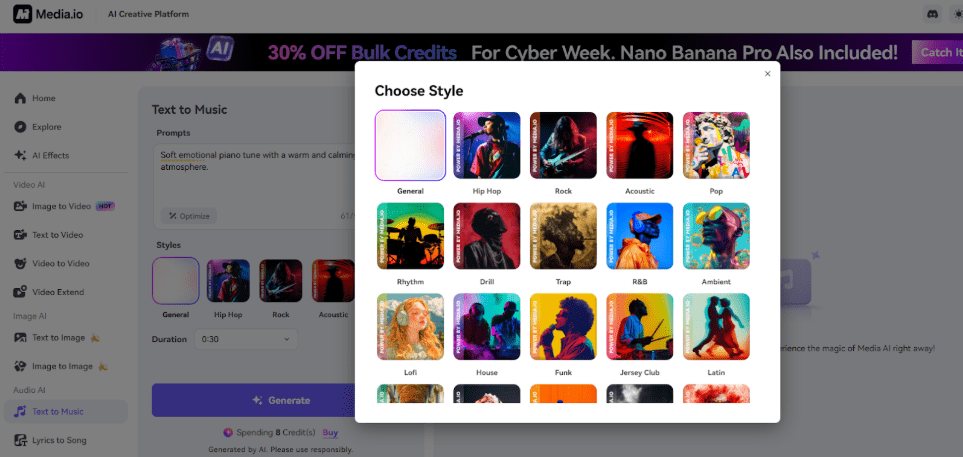
Step 2. Choose a Music Style
Select a mode such as Pop, Acoustic, Rap, EDM, Chill, or Cinematic. This tells the AI how to make an AI song that fits your purpose— background music, a beat, or a full emotional theme.
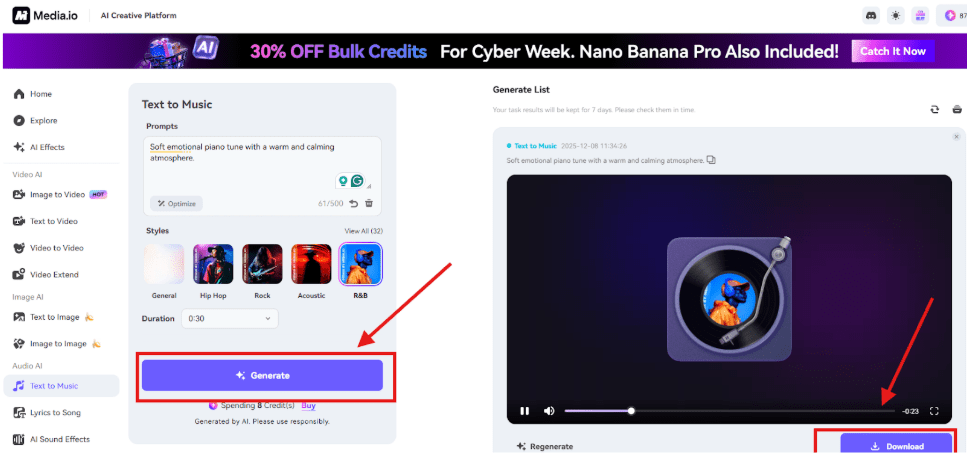
Step 3. Generate and Preview
Click Generate, wait a few seconds, and Media.io will create a polished audio track. You can preview, download, or generate another version if you want different variations.
FAQs
Can I use Media.io to turn my lyrics into a song AI free?
Yes—there is a free tier that allows short music generation for testing ideas.
Does the AI write a full song?
It creates short musical segments you can expand or refine.
Do I need musical experience?
No. This is ideal for beginners or writers without music skills.
Final Thoughts
Text-to-music AI makes it possible for anyone to turn ideas into sound. With Media.io’s multimodal platform, you can go from text → music → cover art → music video → avatar performance without switching tools.
If you’ve been waiting to explore AI songwriting, Media.io is one of the simplest—and most complete—ways to begin.